
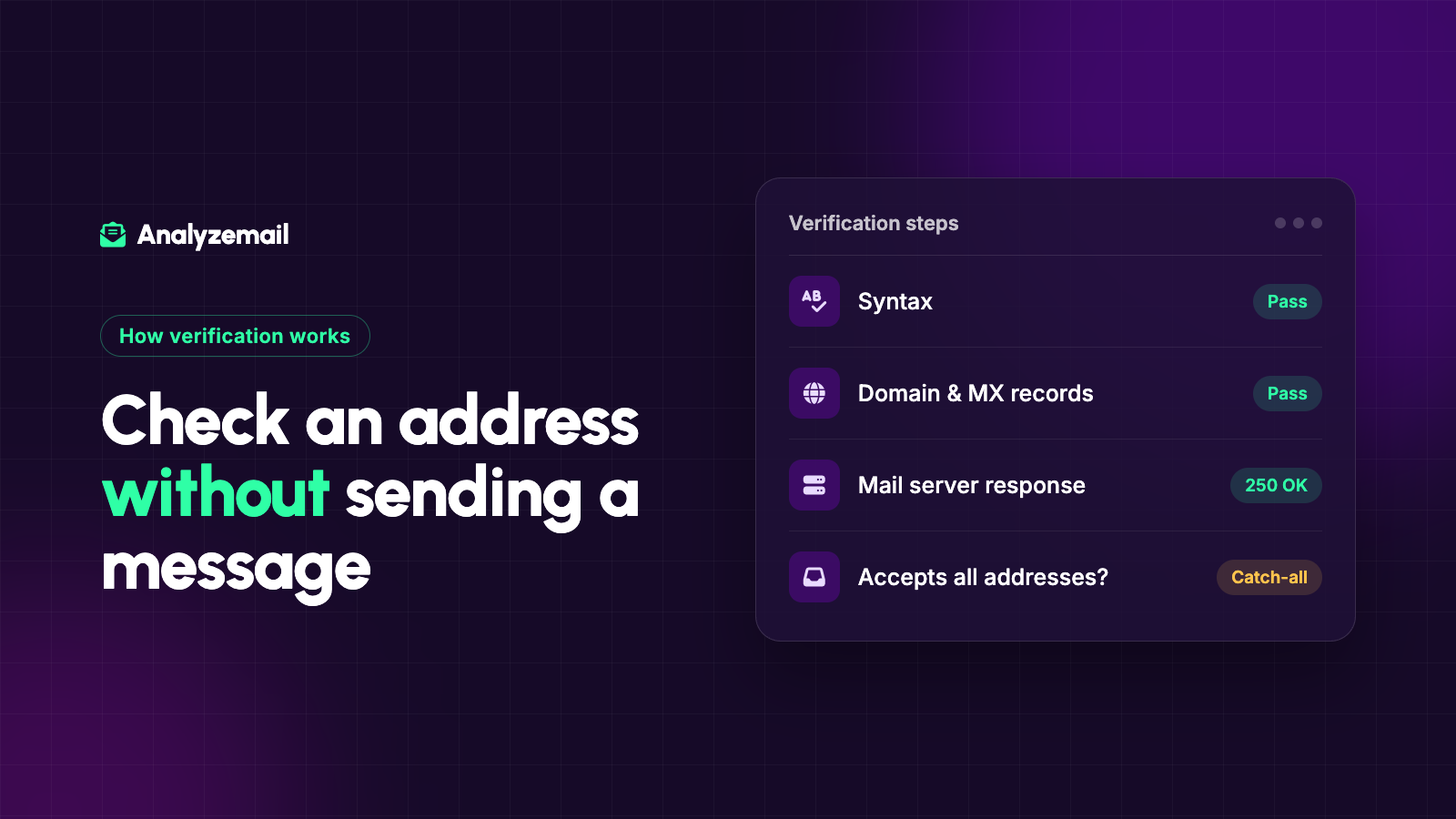
You can check useful signals about an email address without delivering a message to its owner. Those checks can identify malformed addresses, domain problems, and some mailbox failures before you launch a campaign.
What you cannot always do is prove that a specific person owns and reads the mailbox. Email verification is an assessment based on available evidence, and some receiving systems intentionally reveal very little.
That distinction explains why a trustworthy result sometimes says “catch-all” or “unknown.” The checker has reached a limit in what it can confirm. It should preserve that uncertainty instead of inventing certainty.
Here is how the process works and how to use the findings.
What does “verify” actually mean?
People use email verification to describe several different tasks.
A marketer may mean checking whether a list contains undeliverable addresses. A software developer may mean confirming that a user controls an account. A sales representative may mean checking whether a guessed work address belongs to a particular person.
Those are different questions, with different evidence requirements.
| Question | Useful evidence |
|---|---|
| Is the address structurally plausible? | Syntax parsing |
| Does the domain have a usable mail route? | DNS and mail-routing checks |
| Does the server reveal a mailbox problem? | Mail-server response |
| Does this user control the inbox? | A completed confirmation challenge |
| Does the recipient want marketing? | Subscription and preference records |
| Will this campaign reach the inbox? | No address-only check can guarantee this |
Before evaluating a verification tool, decide which question you need it to answer. Otherwise you may mistake a technical result for proof of identity, permission, or future delivery.
Check 1: Parse the address
The first layer checks the address's structure. An entry might be missing its domain, contain extra material from a pasted spreadsheet cell, or combine multiple addresses in one field.
This is a useful starting point because a network lookup cannot rescue an address that was captured incorrectly. However, a simple pattern match is only a first filter. Email syntax has edge cases, and software support varies.
For practical list preparation, separate clear data-entry errors from unusual but potentially supported addresses. Avoid deleting records solely because the local part looks unfamiliar.
If a customer supplied an address that appears misspelled, ask them to correct it through an appropriate channel or compare it with an authoritative customer record. Do not assume a plausible alternative belongs to the same person.
Check 2: Examine the domain's mail setup
The domain is the portion after the @ symbol. DNS can provide information about where mail for that domain should go.
MX records normally identify receiving mail servers. There is an important technical nuance: a missing MX record is not identical to an explicit declaration that a domain accepts no mail. SMTP includes fallback routing behavior in some circumstances, while a null MX record expressly indicates no mail service. These distinctions are described in RFC 5321 and RFC 7505.
For a marketer, the practical lesson is to use a tool that interprets domain findings rather than treating every missing lookup value as the same failure.
A temporary lookup failure also deserves different handling from a domain that definitively does not exist. The first may need another attempt; the second requires correcting or excluding the address.
Check 3: Look for address and domain categories
An address may belong to a shared role inbox, a free webmail provider, or a temporary email service. These categories help explain the record but do not all imply the same action.
For example, a consumer who signs up using a personal mailbox may be exactly the subscriber you want. An accounts-payable role inbox may be the correct place for a vendor relationship. A temporary address used for a long-term subscription deserves a different review.
Treat categories as additional context. Whether they belong in the final audience depends on your use case and the person's relationship with you.
Our guide to role-based, disposable, and free email addresses provides a decision framework for these distinctions.
Check 4: Ask the receiving server
Some validation services open an SMTP conversation and ask about a recipient without completing the delivery of an email message. The receiving server may expose useful information about whether it recognizes the address.
The response is still evidence from a particular server at a particular moment. Security controls, acceptance policies, and temporary conditions can limit what that response proves.
AnalyzeMail describes its mailbox check as contacting the mail server and disconnecting before a message is sent. That allows address assessment without using a campaign or test message as the first check.
It does not require reading a recipient's inbox. It also does not tell you whether the person is interested in your offer.
Why catch-all domains complicate verification
A domain can be configured to accept recipients broadly rather than reject unknown mailbox names during the initial exchange. When that happens, acceptance of your target address does not distinguish it from an address that was never assigned to a person.
That is why a catch-all result should remain separate from a confirmed mailbox result.
Consider two contacts at the same company. One has replied to you recently. The other was guessed from a naming convention. Both may return a catch-all finding, but your relationship evidence is very different.
The right response is to keep the technical finding and the relationship evidence in separate fields. Do not erase the uncertainty because one contact is valuable, and do not assume every contact at the domain is unusable.
See how to handle catch-all email addresses for a fuller workflow.
Why a result may be inconclusive
An inconclusive result means the available checks did not support a confident conclusion. It does not automatically mean the address is invalid.
Your process should distinguish between a confirmed defect and insufficient evidence. Put inconclusive records in a review queue, retain the reason if available, and decide whether another check or better source information can resolve the issue.
For a high-value existing relationship, asking an account owner to confirm the address may be more useful than repeatedly running the same automated check. For an old record with no identifiable source, additional technical attempts may add little value.
Set limits on retries so uncertainty does not become an endless operating cost.
When you do need to send a confirmation message
If the goal is proving inbox control, a confirmation link or one-time code provides evidence that address validation alone cannot provide.
For example, an application may check an address before attempting account creation, then send a confirmation message before activating the account. These steps solve different problems: preliminary address assessment and proof of access.
For marketing, also retain the context of the subscription request. A technically valid address is not a substitute for the user's stated preferences.
Avoid using unsolicited messages as a bulk experiment to discover which guessed addresses happen to work. Build address quality checks into an appropriate collection and subscription process instead.
A practical no-message verification workflow
Start with a list you have a legitimate business reason to process. Preserve the original records and the information needed to match results back to them.
Prepare the required file format, run the checks, and keep the full findings. Separate clear failures from uncertain records and from categories that need business judgment. Then reconcile the proposed send audience against current suppression and preference data.
Record when the check took place. Addresses and domain settings can change, so an old result should not be treated as a permanent certificate.
Can verification guarantee zero bounces?
No. The destination, sending system, message, and timing all affect the eventual outcome. Even a previously working address can encounter a later problem.
Use verification to reduce avoidable address uncertainty before a send. Use delivery reports afterward to understand what actually happened.
If you want to check a list without delivering messages to its contacts, start with AnalyzeMail and review the findings before building your final campaign audience.